
Data Versioning
A clinical record was modified. Who changed it? What did it say before? When exactly did it change?
In most systems, the answer is "we don't know" — the original data was overwritten. In healthcare, that's not acceptable. Clinical records may be referenced in legal proceedings, insurance disputes, regulatory audits, and clinical research. The history of a record is as important as its current state.
In Atomik — following the openEHR model — nothing is ever overwritten. Every modification creates a new version, linked to the previous one. The complete history of every record is always available, queryable, and tamper-evident.
How versioning works
Every top-level clinical or demographic object in Atomik is versionable:
- EHR_STATUS
- FOLDER
- COMPOSITION
- PERSON
- ORGANISATION
- GROUP
- AGENT
- PARTY_RELATIONSHIP
When one of these objects is first created, Atomik wraps it in a VERSIONED_OBJECT — a container that holds all future versions of that record. Each change adds a new VERSION to that container. The original is never touched.
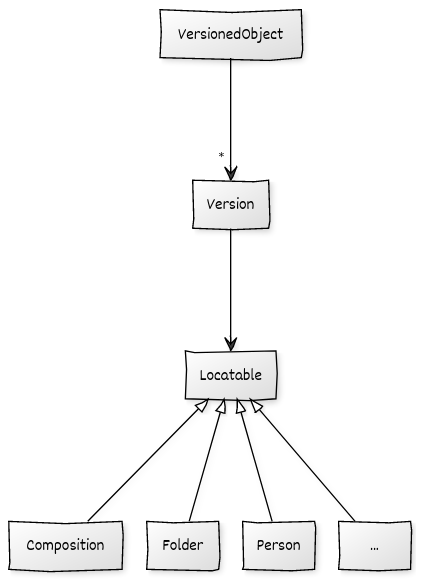
Each VERSION carries its own unique identifier — an OBJECT_VERSION_ID composed of three parts:
- object_id — the ID of the containing VERSIONED_OBJECT (same across all versions of the same record)
- creating_system_id — namespace identifying the system that created this version
- version_tree_id — a linear version counter (1, 2, 3…)
Versioning in Atomik
Version IDs in Atomik look like this — the same record across three changes:
- Create: 1b2d2be2-24ff-48da-9ff0-e835ce36b80f::ATOMIK_EMR::1
- Modification: 1b2d2be2-24ff-48da-9ff0-e835ce36b80f::ATOMIK_EMR::2
- Modification: 1b2d2be2-24ff-48da-9ff0-e835ce36b80f::ATOMIK_EMR::3
All three share the same VERSIONED_OBJECT ID. Version 1 is never deleted. At any point you can retrieve what this record looked like at version 1, 2, or 3 — and each version carries its own audit trail (see Audit and Logging).
Versioning and the REST API
The openEHR REST API provides GET endpoints that accept either:
- A full OBJECT_VERSION_ID — retrieves that exact historical version
- A VERSIONED_OBJECT ID — retrieves the latest version
This means your application can always access both current state and full history through the same standard API, with no custom query logic required.